About MNP

New customers
Contact us by phone
(Free call)0120-989-970
9:00-18:00 [Open all year round]
What is MNP
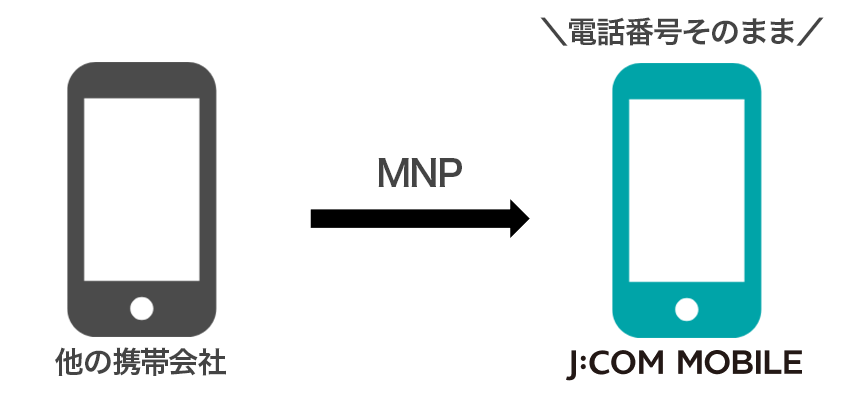
Even if you change mobile carriers, you can keep your current phone number.
What is MNP One-Stop?
MNP One-Stop is a method that eliminates the need to obtain an MNP reservation number, which was previously required when switching from another company while keeping the same phone number. This makes the process simple and smooth.

MNP One-Stop Eligible Carriers
- NTT Docomo
- Ahamo
- au
- UQ Mobile
- Povo
- Softbank
- Y!Mobile
- LINEMO
- LINE Mobile
- Japanet Takata Communication Service
- HIS Mobile
- RayL Mobile
- NifMo
- OCN Mobile ONE
- Rakuten Mobile
- Rakuten Mobile (Docomo line/au line)
- Japan Communications SIM, b-mobile
- Mineo
- Center Mobile
- LP Mobile
- IIJmio
- NURO Mobile
- BIGLOBE Mobile
- AEON Mobile
- HIS Mobile
- KABU&Mobile
- RayL Mobile
- Smiles Connect
- NifMo
- Mercari Mobile
- OCN Mobile ONE
- ANA Mobile
- As of April 2026
How to get MNP reservation number
If your contracted mobile carrier is not eligible for One Stop or you are unable to log in, please issue an MNP reservation number.
User NTT DoCoMo
| from the web |
<How to access> <Reception hours> |
|---|---|
| from the phone |
<From a DoCoMo mobile phone> <Reception hours> |
| from shop |
<Reception hours> |
User au/Okinawa Cellular
- If you wish to re-acquire your ticket due to expiration, please check the notes at the bottom of the page.
| from the web |
<How to access> <Reception hours> |
|---|---|
| from the phone |
<common to au mobile phones/general phones> <Reception hours> |
| from shop |
<Reception hours> |
SoftBank User
| from the web |
<How to access> <Reception hours> |
|---|---|
| from the phone |
<From SoftBank mobile phone> <Reception hours> |
| from shop |
<Reception hours> |
User Rakuten Mobile
| from the web |
<How to access> <Reception hours> |
|---|---|
| from the phone |
<携帯電話/一般電話共通> <Reception hours> |
ahamo User
| from the web |
<How to access> <Reception hours> |
|---|
User UQ mobile
| from the web |
<How to access> <Reception hours> |
|---|---|
| from the phone |
<Common to mobile phones and regular phones> <Reception hours> |
User povo
| from the web |
<How to access> <Reception hours> |
|---|
Ymobile User
| from the web |
<How to access> <Reception hours> |
|---|---|
| from the phone |
<Common to regular phones> <Reception hours> |
| from shop |
<Reception hours> |
LINEMO User
| from the web |
<How to access> <Reception hours> |
|---|
- This is the procedure as of September 2024. Access procedures and contact information may change in the future. Please contact each company for details.
- Even if the online reservation service is available 24 hours a day, if you apply for a reservation number after 8 p.m., it may not be issued until 9 a.m. the next morning. Please contact each company for details.
| Points to note about MNP |
|---|
|
① The MNP reservation number is valid for 15 days from the date of acquisition. Customers who wish to use MNP must apply immediately after obtaining the number. For reservations by telephone, please obtain the MNP reservation number after receiving the application documents and return them as soon as possible. |
| (2) Only the "phone number" is carried over with MNP. Your email address and other information will not be carried over, so you will need to migrate the data yourself. |
| ③ When the MNP transfer procedure (line opening) is completed, the contract with the original mobile phone company will be automatically canceled. |
FAQ
今の電話番号をそのまま使用できますか?
MNP(携帯電話番号ポータビリティ)の手続きをしてお申し込みいただくことで、現在の番号をそのままご使用いただけます。
J:COM MOBILEのお申し込み方法について詳しくはこちら
MNP予約番号は事前に取る必要がありますか?
「MNPワンストップ」対応の携帯会社からの乗り換えであれば、予約番号なしでお手続き可能です。
MNP予約番号を使用しお手続きされる場合は、お申し込み前に取得をお願いします。
お申し込み時点で、有効期限が10日以上残っている必要があります。
乗り換え時にスマホが使えない期間はありますか?
新しいSIMカードに切り替える開通手続きの間、数分〜数十分程度使用できない時間がある場合もございますが、手続き完了後はすぐにご利用いただけます。
今契約中の携帯会社の解約手続きは自分でやる必要がありますか?
電話番号を引き継ぎされる場合は解約手続きは必要ありません。J:COM MOBILEへの切り替え(開通)が完了した時点で、以前の携帯会社は自動的に解約となります。
MNP予約番号の有効期限はどのくらい必要ですか?
お申し込み時点で、有効期限が10日以上残っている必要があります。期限が近い場合は、再発行をお願いする場合があります。
土日でもMNPの切り替えはできますか?
はい、土日祝日も開通のお手続きが可能です。ただし、受付時間は9:00〜20:00となりますのでご注意ください。
20:00~21:00も手続きは可能ですが、回線切り替えが翌日になることがあります。当日の回線切替をご希望の場合は、時間に余裕をもって手続きください。
[Notes]
[About MNP line switching]
- Some phone numbers may not be available.
- At the time of application, you will need an MNP reservation number with a validity period of 10 days or more.
- There may be cases where the email address you used before switching cannot be used, or where data transfer is required to continue using the apps you are currently using.
[For those using au/Okinawa Cellular and wishing to reacquire]
- If your MNP reservation number has expired after you applied to JCOM, you will not be able to re-acquire it using the method described above.
We apologize for the inconvenience, but please contact J:COM Customer Center (0120-938-362).