Complete Support
Don't worry if you are new to smartphones!
Leave the initial settings and operating instructions to J:COM
Customers with terminal + SIM
Leave the initial settings of your smartphone to us by remote control!
For customers who wish, we will guide you through the initial settings by remote control, so even those who are new to smartphones can use it with confidence.

Basic initial settings of J:COM MOBILE terminal *1
MNP line switching support (for customers switching from another company) *2
Google account and other app settings, etc. *3
Troublesome initial settings can be solved with free support!
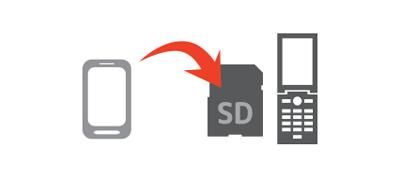 *A separate SD card is required.
I want to take over my friend's contact information as it is!
Supports phonebook migration
Feel free to contact your family and friends!
Support for LINE migration and settings

I don't know the initial settings
The operator
Remote support

お子さまを危険なサイトやアプリから守るために、フィルタリングサービスのご利用をお願いいたします。設定方法について詳しくはこちら
- 初期設定には、Wi-Fi環境が必要です。Wi-Fiモデムのパスワードは事前にご準備ください。
- MNP line switching procedures are required. Learn more here.
- If you already have a google account, please prepare in advance.
Leave the initial settings to our on-site support!
Customers who wish to use the service will be guided through the initial settings through on-site support, so even those who are new to smartphones can use it with confidence.
[Initial settings support (J:COM MOBILE)]
- This offer is available to new applicants for the "J:COM MOBILE A Plan ST" (however, if you only have SIM Card contract, only APN settings/MNP switching is available).
- Visit settings are applicable to those who purchase a device at the same time as applying for a new "J:COM MOBILE A Plan ST."
- Multiple lines can be applied only once at the time of new contract. Transferring data from an old device or taking over a LINE account may not be supported.
- Taking over of LINE "talk history" is not eligible.
Free warranty
Within a certain period of time after purchasing the device, if it is a spontaneous failure, we will repair it free of charge. Please check the table below for the period.
- If a certain period of time has passed after purchase, it will be charged.
- Apple社の製品はAppleにお問い合わせください。
| Target terminal | Android |
|---|---|
| Free warranty period | Within 12 months |
- If you wish to rent a replacement device during repair, you can rent it for a fee.
- There may be a charge depending on the analysis results by the manufacturer.
If you want to prepare for troubles that are not covered by the free warranty or for loss of your device, we recommend the paid option "Peace of Mind Device Warranty 60" or, for iPhone users, "AppleCare+ for iPhone."
Respond to any problems after joining
Enkaku support
Enkaku Support is a service that allows J:COM to resolve any problems customers may have and allow them to use "J:COM MOBILE" comfortably.
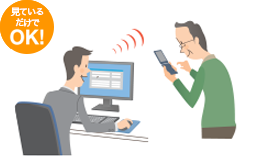
Remote support
When you have a problem with email or Wi-Fi settings, etc., you can share your screen and solve the problem remotely.

Dedicated number support
You can consult the professional support staff as many times as you like!
- We also offer on-site support for a fee. Click here for details
- In the Oita area, support will be provided via "Anshin Remote Support". Click here for details.
Support/Frequently Asked Questions
I want to know the initial settings
Start guideI want to find out what I don't understand
mobile supportTelephone inquiries (toll free)0120-919-988 9:00-18:00 [Open all year round]
SIM Card customers
Easy! Cheap SIM that can be used immediately
For customers who wish, we will guide you through the initial settings by remote control, so even those who are new to smartphones can use it with confidence.
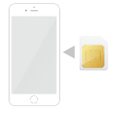
配送時同梱のご案内で、かんたんに設定いただけるようになっているほか、サポートサイトでも詳しくご案内しております。
You can also contact us by phone regarding the following.
Wi-Fi connection settings
Switching MNP lines (customers switching from another company) *1
APN settings (network settings) *2
Telephone inquiries (toll free)0120-919-988 9:00-18:00 [Open all year round]
eSIM customers
With eSIM, you can open your account in as little as 60 minutes * after applying.
Setup is easy by downloading the eSIM profile, and detailed instructions are also available on the support site.
If you apply between 10:00 and 18:00, activation can take anywhere from 60 minutes to a few hours.
Depending on the time of application, the level of congestion, and the status of the review, it may take several days for the service to be activated.
You can also contact us by phone regarding the following.
Wi-Fi connection settings
Switching MNP lines (customers switching from another company) *1
APN settings (network settings) *2
Download eSIM profile
 Smartphone savings calculator
FAQ
Procedures such as contracting and changing models are cumbersome.
You can apply for J:COM MOBILE online. You can complete the process from the comfort of your own home, so there is no need to go to a store and wait for a long time.
スマホがお手元に届いてからは、ご希望の方には訪問のサポートを受けていただくこともできます。初期設定はもちろん、スマホの使い方も丁寧に説明します。
お住まいの地域によって、訪問サポートが対象外の場合がございます。詳しくはお問い合わせください。
I want to know about support after joining
We offer a wide range of contact methods, from inquiries by phone or chat to guidance on our homepage with support information. In addition, by subscribing to Enkaku Support (550 yen per month (tax included)), you can receive remotely operated support from an operator.
Where can I check what plan I have?
You can check the plan you are subscribed to with J:COM MOBILE on My Page.
Where can I see my call details?
You can check your J:COM MOBILE call details on My Page.
I want to transfer data such as my phone book to a new smartphone, what should I do?
J:COM MOBILEでは、ご希望の方には初期設定や電話帳データの移行、使い方説明など無料のサポートにて丁寧にご説明します。
無料の初期設定サポートは新規ご契約時1回のみとなります。
Can I continue to use the email address I'm currently using on my J:COM MOBILE smartphone?
If you are using a free email service such as Gmail, you can continue to use it by logging in or setting up a new device.
Please note that if you are using an email address (domain) issued by some telecommunications companies, you will not be able to use it.
- There are some services that allow you to continue using carrier mail even after canceling your carrier. Please refer here for details.
J:COM MOBILE does not issue email addresses, so we recommend that you switch to a free email such as G-mail in advance.
Can I carry over unused data usage?
Unused data traffic will be automatically carried over to the next month.
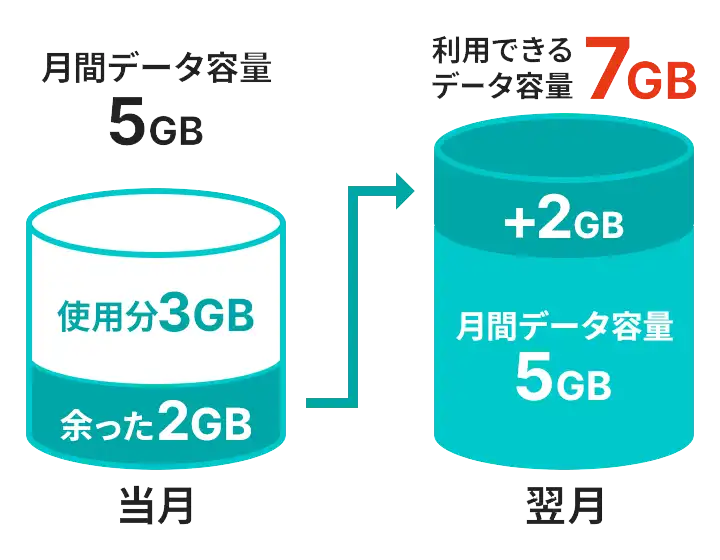
*The remaining amount is valid until the end of the following month.
If the upper limit is exceeded, the speed will be limited to 1Mbps or 200kbps depending on the plan you subscribe to. In addition to the data usage of your contract plan, you can also carry over any additional data usage you purchase to the next month.
Please check here for more information, including expiration dates.
Can I continue to use LINE on my new device?
By completing the appropriate settings and procedures, you can continue to use the service on your new device.
アカウントの移行(引き継ぎ)方法につきましては、定期的にセキュリティが強化されております。LINE公式サイトより最新情報をご確認のうえ、お手続きください。
(※機種変更前に設定が必要な場合がありますので、ご注意ください。)
[About the amount including tax]
- Consumption tax differences may occur due to changes in the consumption tax rounding method under the invoice system.